
BEYOND THE DIRECTORY
Choose a class for the way you want to fight: hold the frontline, attack up close, shoot from range, cast area spells, support teammates, or earn Gold. Master Aldric lets you switch classes for free.
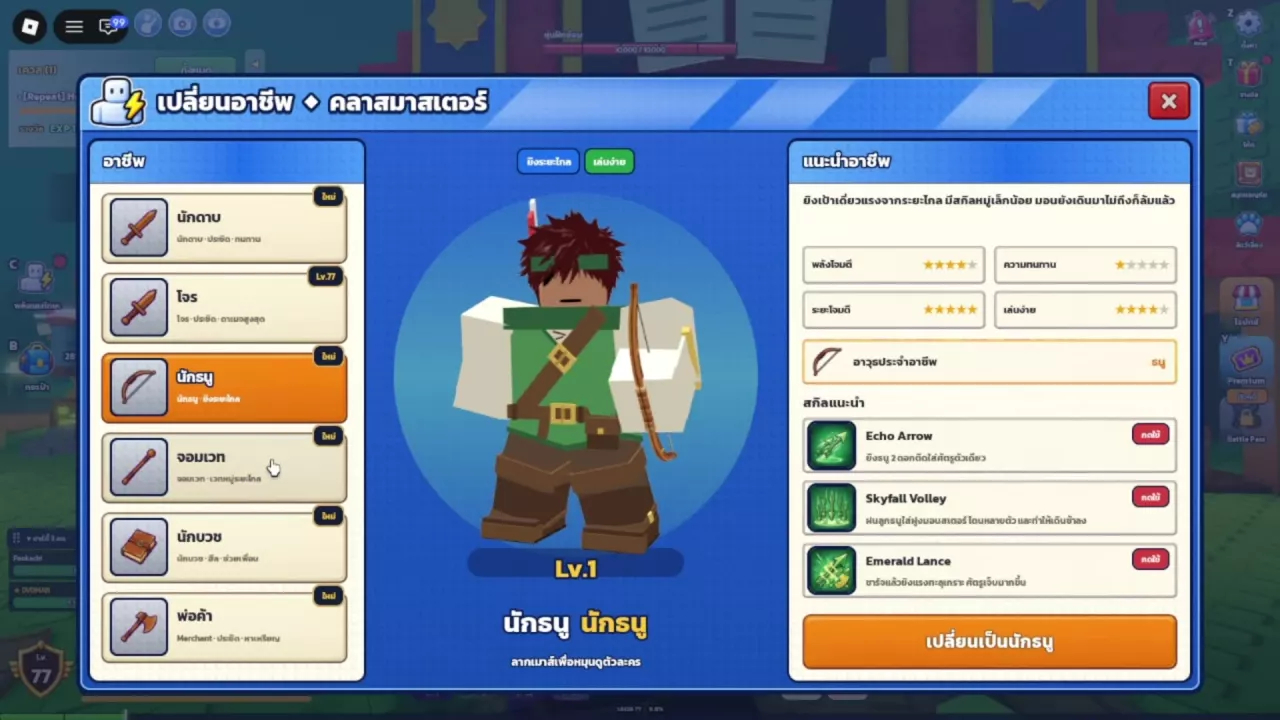
Hunting Together has six classes: Swordsman uses swords, Thief uses dual daggers, Archer uses bows, Mage uses staffs, Cleric uses spellbooks, and Merchant uses axes. To change class for free, find Master Aldric outside the building with the book sign in the village center. Press E at the Master Class prompt, select a class, and click its change-class button. Each class keeps its own level progression.
The Six Classes at a Glance
- Choose Swordsman for a forgiving start or a party frontline. Its high durability and highest HP help it absorb damage, while defensive and self-healing skills support close combat. It can draw monsters and bosses toward the frontline.
- Choose Thief for fast solo melee combat. Repeated attacks and critical hits suit players who want to focus on close-range damage. Attack speed, damage, and critical-hit equipment support that approach.
- Choose Archer for ranged farming. Sustained shooting lets you attack from a distance, with some group attacks and control. Its low HP makes positioning more important when enemies close in.
- Choose Mage for area damage. Fire, ice, and lightning spells give it several ways to attack groups. Account for casting time; stat and equipment choices that improve casting speed support this playstyle.
- Choose Cleric for party healing and support. It can buff allies, heal itself and nearby teammates, and revive fallen teammates without a revival item. Its support focus can make solo progression harder.
- Choose Merchant for Gold-focused melee play. It combines relatively high attack and moderate durability with money-making abilities and advantages when buying and selling.
For a ranked solo recommendation, see the solo leveling class tier list. Once you choose a class, use the class stat and skill builds for point priorities, equipment direction, and supplies. The skills directory covers individual effects and upgrade controls.
-
Swordsman
- Role
- Melee frontline and tank
- Weapon
- Sword
- Durability
- Highest HP; can absorb damage for teammates
- Recommended use
- Beginner play and drawing monsters or bosses to the frontline
-
Thief
- Role
- High-damage melee attacker
- Weapon
- Dual daggers
- Combat style
- Fast repeated attacks and critical hits
- Recommended use
- Solo melee combat
-
Archer
- Role
- Ranged attacker
- Weapon
- Bow
- Combat style
- Long-range sustained shooting with some group attacks and control
- Durability
- Low HP and relatively fragile
- Recommended use
- Fast ranged farming
-
Mage
- Role
- Ranged area magic
- Weapon
- Staff
- Combat style
- Fire, ice, and lightning spells with casting time
-
Cleric
- Role
- Healing and party support
- Weapon
- Spellbook
- Support abilities
- Buff allies, heal self and nearby teammates, and revive fallen teammates
- Revival item required
- No (Reviving teammates with the class's revival ability)
-
Merchant
- Role
- Melee combat and gold generation
- Weapon
- Axe
- Combat profile
- Relatively high attack and moderate durability
- Trading advantage
- Buy at lower prices and sell at higher prices (Class advantage)
Find Master Aldric and Change Class
Class changes at Master Class are free.
- Find Master Aldric in the village center. He stands outside the building with the book sign. Look for white hair, a dark beard, a blue-and-gold robe, and a book.
- Approach him and press E at the Master Class interaction prompt.
- Select the class you want from the left-hand list. Review its level, role, weapon, recommended skills, and character preview.
- Click that class’s change-class button. A successful switch updates your active class label and appearance. When viewing your current class, the bottom button indicates that it is already in use.
Selecting an entry only opens its preview. Closing the menu without confirming leaves your active class unchanged. The orange button at the bottom right of another class’s preview is the control used to switch.
For your first class, use Choose Your Job, select a class, and click its Choose button—for example, Choose Swordsman. You can drag the character preview to rotate it.
Separate Levels and Shared Passive Progression
Each class levels separately and keeps its own progress when you switch. A high-level main class does not give another class the same level. Check the individual class entries in Master Class to see where each one stands; returning to a previously trained class resumes that class’s progression.
Training additional classes can strengthen your main class through shared passive abilities. A straightforward approach is to finish leveling your preferred class, then switch to other classes for those passive benefits. This keeps your early effort focused while giving you a reason to develop more than one class later.
During the Beta Test, reaching level 99 on three classes qualifies you for the Limited Ice Cat reward. See Beta rewards and launch carryover for reward timing, claiming details, and what carries over.