
AT A GLANCE
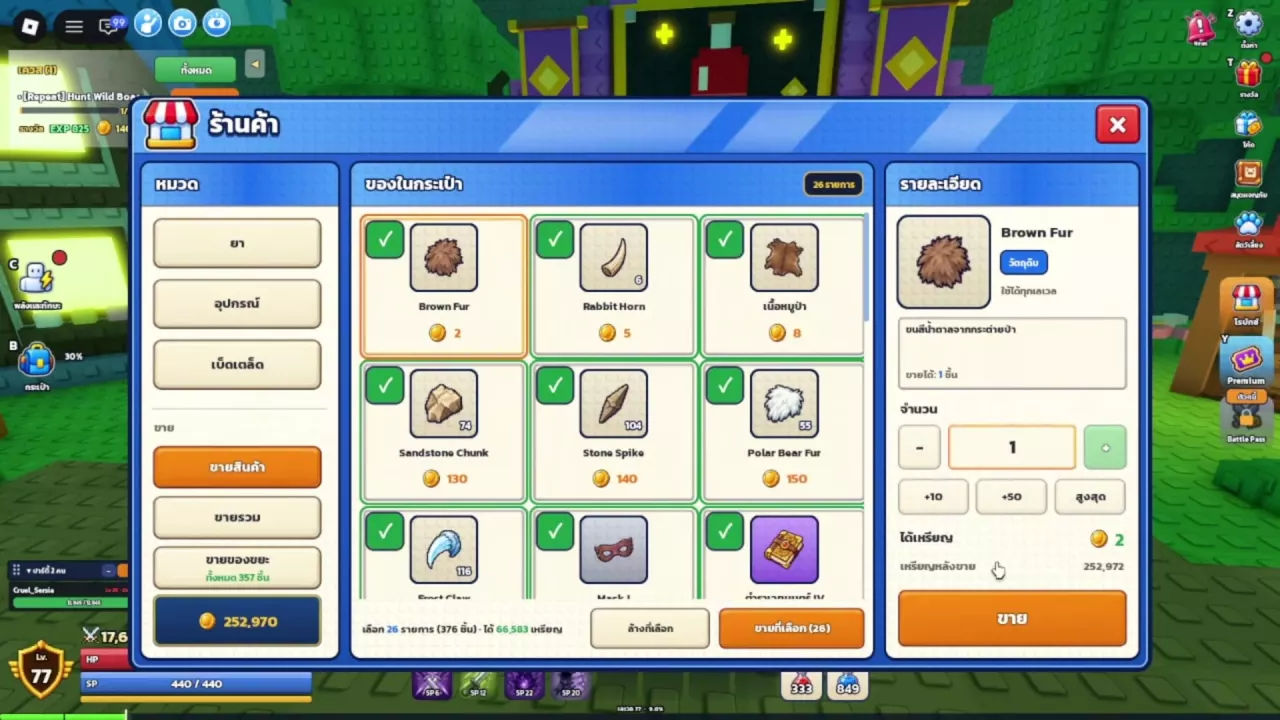
Press B or click the bag icon on the left to open your inventory. To sell items, approach the potion merchant, press E, and open the selling tab. Set a quantity for a single item, or select a batch, untick anything you want to keep, review the total, and click Sell Selected. Your base bag capacity is 120 slots. Find storage NPC Oliver outside the book-sign building, to the right of Master Aldric.
Open and Organize Your Bag
- Press B or click the bag icon on the left to open the bag and equipment panels.
- Use the sorting control to organize the item grid. Options include Normal and rarity.
- Use Select Many when you want to select multiple items.
The adjoining equipment panel has Auto Equip, Unequip All, Skins, Cards, and Loadout controls. For weapon compatibility, equipment slots, and comparing upgrades, use the equipment guide.
Check Capacity and Expansion Options
Your bag starts with 120 slots. Hover over the capacity bar to see how much space comes from the base allowance, purchased slots, and Premium.
For example, a bag with 120 base slots + 20 purchased slots + 0 Premium slots has 140 total slots. The purchased contribution is specific to that configuration.
- Permanent Premium adds 30 bag slots. Its Beta-era shop offer costs 399 Robux. Open the shop icon on the right and choose the Premium category to find it.
- Extra Bag Slots at 149 Robux is listed for sale.
- A separate product also named Extra Bag Slots grants 50 permanent slots, but is not for sale. Its 50-slot benefit does not describe the 149-Robux listing.
Sell unwanted items first if you only need to clear accumulated clutter. If you regularly keep useful equipment and supplies, compare the game passes and Premium benefits before choosing an expansion.
Sell One Item or a Selected Batch
Approach the potion merchant, press E to talk, and switch to the selling tab.
Sell a single item
- Select the item in the selling list.
- Set the quantity with −, +, +10, +50, or the maximum-quantity button.
- Review the gold amount for that quantity, then click Sell.
- Check the sale feedback to confirm the transaction.
For example, selling 1 Brown Fur gives 2 gold. Use the materials and stone reference to look up other material prices and acquisition details.
Sell several items at once
- Tick the entries you want to sell. Use Select All if most of the list is unwanted.
- Untick every item you want to keep. Use Clear Selection to start over if needed.
- Review the selected entries, quantities, and estimated total.
- Click Sell Selected, then check the completed-sale feedback.
The preview applies to the current selection. If you remove items, the earlier total no longer represents what you are selling. Use individual selection when you only have a few unwanted items; it makes the sale easier to review than selecting everything first.
For combining loot sales with quest income and planning purchases, see the gold farming and spending guide.
Keep Gear for Your Other Classes
Keep weapons and equipment you expect to use on another class, even if your current class has no use for them. Before deciding something is disposable, compare its role and stats in the weapons, armor, and accessories guide.
Use item locking where available and look for the lock marker on the bag slot. Whether an item is locked or unlocked, exclude it from your sale selection if you want to keep it; do not rely on locking to protect it through every selling option.
The inventory and shop also have junk-selling entries. For a clear choice of exactly what leaves your bag, use the individual checkboxes in the batch-selling list.
Find Oliver and the Loadout Entry
Storage NPC Oliver
Find Oliver in town, outside the building with the book sign, to the right of Master Aldric. He has brown hair, blue clothing, and a diagonal strap. For nearby services, use the town NPC location guide.
Gear loadouts
Press B and look for Loadout in the equipment controls. The Extra Loadout pass grants one permanent extra gear loadout slot, but it is not for sale. See the pass benefits guide for its listing alongside the other paid options.